How to Withdraw Your Y999 Game Winnings
Cashing out from Y999 Game uses the same local payment rails as depositing - JazzCash, EasyPaisa or bank transfer - so there's nothing new to set up. This guide covers the withdrawal steps in full, why a payout sometimes takes longer than expected, how limits and VIP tiers work, and what to do if something goes wrong.
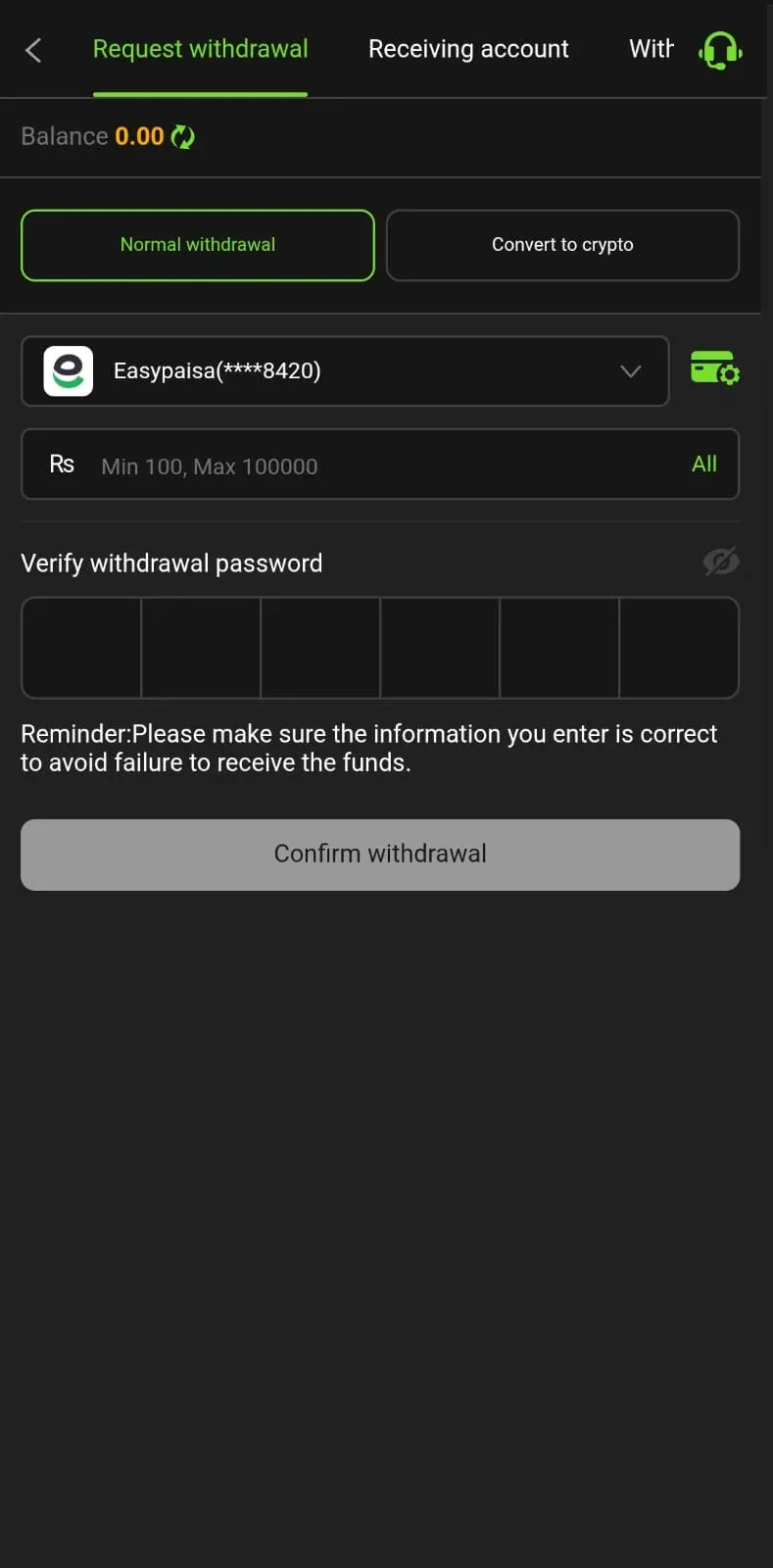
Withdrawal Steps
The overall flow is the same whichever account you're cashing out to - pick your method below for the full walkthrough.
Open the Withdraw section
Log in to the app and go to the "Withdraw" or "Cash Out" section, usually found on the wallet or profile screen.
Confirm your EasyPaisa account
Check that the EasyPaisa number linked to your profile is correct and matches the one you used to deposit - see the section below on why this matters.
Enter the withdrawal amount
Type in how much you want to withdraw. It must meet the minimum payout limit shown in the app and sit within any daily or weekly limit on your account.
Review and submit
Double-check the amount, the EasyPaisa number, and any fee shown before confirming - this is the last point to catch a typo before the request is submitted.
Wait for processing
Most withdrawals complete within minutes to a few hours. Keep the request reference shown in the app in case you need to follow up.
Check your EasyPaisa app
Funds arrive directly in EasyPaisa, not back in the Y999 wallet - check there rather than the game itself for confirmation.
Open the Withdraw section
Log in to the app and go to the "Withdraw" or "Cash Out" section, usually found on the wallet or profile screen.
Confirm your JazzCash account
Check that the JazzCash number linked to your profile is correct and matches the one you used to deposit - see the section below on why this matters.
Enter the withdrawal amount
Type in how much you want to withdraw. It must meet the minimum payout limit shown in the app and sit within any daily or weekly limit on your account.
Review and submit
Double-check the amount, the JazzCash number, and any fee shown before confirming - this is the last point to catch a typo before the request is submitted.
Wait for processing
Most withdrawals complete within minutes to a few hours. Keep the request reference shown in the app in case you need to follow up.
Check your JazzCash app
Funds arrive directly in JazzCash, not back in the Y999 wallet - check there rather than the game itself for confirmation.
Open the Withdraw section
Log in to the app and go to the "Withdraw" or "Cash Out" section, usually found on the wallet or profile screen.
Confirm your bank account details
Check that the account number/IBAN linked to your profile is correct and matches the account you used to deposit - see the section below on why this matters.
Enter the withdrawal amount
Type in how much you want to withdraw. It must meet the minimum payout limit shown in the app and sit within any daily or weekly limit on your account.
Review and submit
Double-check the amount, the bank account number, and any fee shown before confirming - this is the last point to catch a typo before the request is submitted.
Wait for processing
Bank withdrawals can take a little longer to clear than mobile wallets, especially outside banking hours. Keep the request reference shown in the app in case you need to follow up.
Check your bank account
Funds arrive directly in your bank account, not back in the Y999 wallet - check your bank statement or app rather than the game itself for confirmation.
Why a Withdrawal Might Be Delayed
Most withdrawals go through without any issue, but when one takes longer than expected it's almost always one of three things.
Unmet bonus wagering requirements
A wagering requirement is a condition attached to bonus money: you have to play through it a certain number of times before that balance - or any winnings made from it - becomes withdrawable. It exists so that bonuses are used for actual play rather than claimed and cashed out immediately.
If part of your balance came from a welcome bonus, daily login reward, or promotion, check the wagering status for that bonus before requesting a withdrawal - it's usually listed on the same offer screen where you claimed it, or in your account's bonus history. If the requirement isn't met yet, the bonus portion (and anything won from it) stays locked until it is, even if your withdrawal request otherwise goes through fine.
The simplest way to avoid this becoming a surprise is to read the wagering terms when you claim a bonus, not when you try to withdraw - by then the rules are already fixed.
Mismatched account details
Withdrawals are sent to the payment account already on file for your profile - typically the same JazzCash, EasyPaisa, or bank account you used to deposit. This isn't an arbitrary restriction: sending money to the account that funded the wallet in the first place is a basic check that the person withdrawing is the same person who deposited, which protects both the player and the platform from fraud.
Problems show up when the name on the payment account doesn't match the name on your Y999 account, or when you try to withdraw to a different number or bank account than the one you deposited from - for instance, depositing from a family member's JazzCash number and then trying to withdraw to your own EasyPaisa account. The fix is straightforward: register and pay with accounts that are in your own name from the start, and if you genuinely need to change your payment details, contact support and get it sorted before submitting a withdrawal, not after.
Verification checks on larger withdrawals
Larger withdrawals, or a first payout to a newly added account, can trigger a manual verification check before approval. This is standard for the industry and isn't a sign that anything is wrong with your account.
In practice, a verification check usually involves confirming that you're the genuine owner of the account - matching your registered details against the payment account, and occasionally asking for a quick confirmation through the app or support chat. It's the same kind of check most payment apps and banks run before releasing a larger sum, just applied at the gaming platform's end instead.
You can't skip a verification check, but you can avoid extending it: keep your registered name, number, and payment details consistent and up to date, and respond promptly if support asks for anything to confirm the request.
Withdrawal Limits and VIP Tiers
Withdrawals have a minimum amount, shown in the app's Withdraw screen. Minimums like this exist across the industry for a simple reason: without one, the system could be used to send hundreds of tiny test transfers rather than genuine cash-outs, which would slow processing down for everyone.
There are also limits on how much can be withdrawn over a given period. These aren't meant to cap how much you can win - they're a standard control that lets the platform review larger movements of money sensibly rather than processing everything instantly with no checks at all.
Y999 Game runs a VIP tier program for regular players. As you deposit and play consistently over time, your account can move up through tiers that typically unlock higher withdrawal limits alongside other perks like dedicated support and bigger rewards. If withdrawal limits feel restrictive for how you play, building up activity on your account is generally how that gets addressed, rather than working around the limit with a different account.
Troubleshooting Common Withdrawal Issues
A few specific situations come up often enough to be worth covering directly.
Whatever the issue, contacting support goes faster when you have these ready: your request ID or transaction reference, the payment account used, the exact amount, and the time you submitted the request. That's usually enough for support to locate the transaction without back-and-forth.
Withdrawing Responsibly
Withdrawing your winnings at reasonable intervals - rather than leaving everything in the wallet to get re-wagered into the next session - is a sensible habit. It turns a win into something real instead of just a higher number to risk again.
This is a different mindset from chasing losses, which is increasing stakes or delaying a withdrawal specifically to "win back" money already lost. Treat the decision to withdraw and the decision to keep playing as two separate choices, made on their own merits rather than in reaction to a bad session.
A simple rule: if a session has gone well, withdraw at least a portion of the profit before continuing. That way, even if the next session goes badly, the win is already in your wallet as real money - not just a balance that got wagered back.
Payout Submitted
Your withdrawal request is on its way. Keep an eye on your payment app, and remember to play within a budget you've set in advance.