How to Deposit Money on Y999 Game
Y999 Game supports the payment methods most players already have set up - JazzCash, EasyPaisa and bank transfer. Deposits typically reflect in your wallet within minutes, funding a single wallet balance you can use across every game on the platform - Teen Patti, Aviator, slots and more.
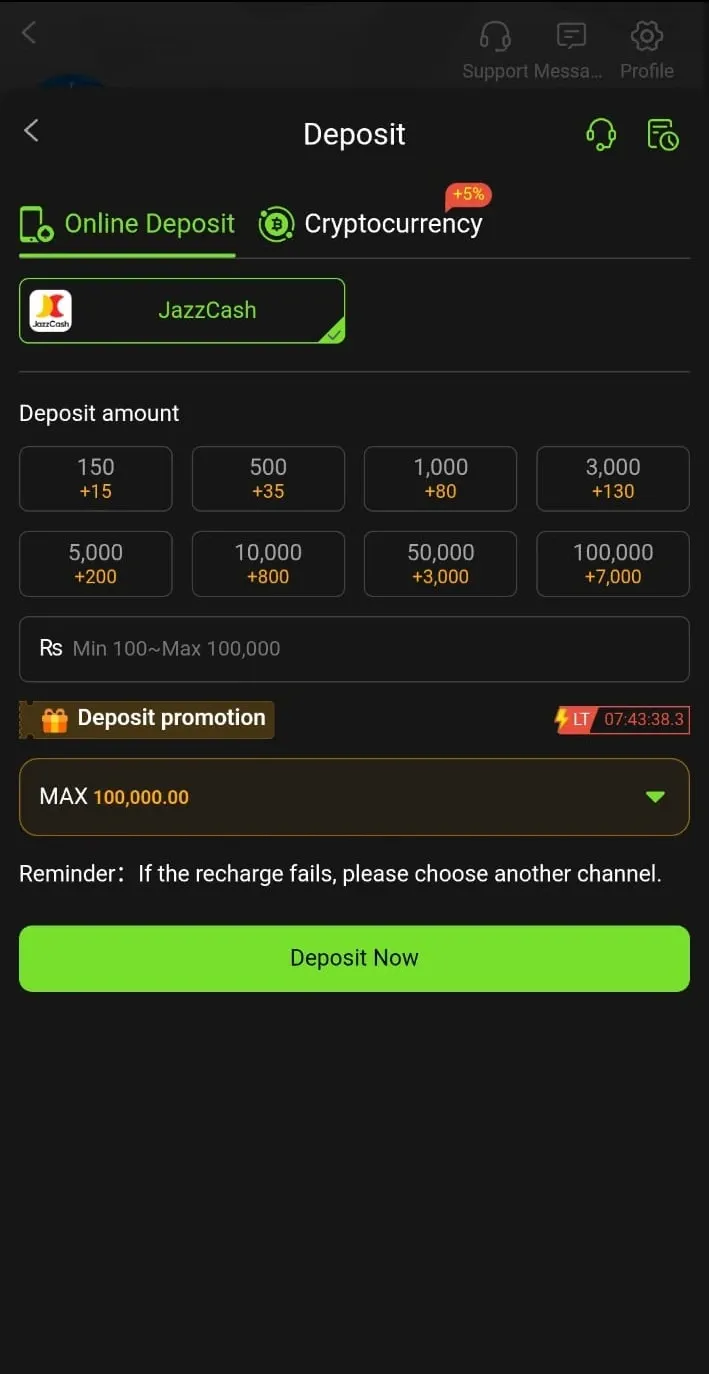
Deposit Steps
The overall flow is the same for every method, but the exact screen you confirm on differs. Pick your payment method below for the full walkthrough.
Open the Deposit section
Log in to the Y999 app and go to the "Deposit" or "Recharge" section, usually reached from your wallet balance or the home screen.
Select EasyPaisa
From the list of payment methods, tap EasyPaisa. The app will show the account number or details to send your funds to.
Enter your deposit amount
Type the amount you want to add to your wallet, checking the minimum and maximum shown on screen first.
Send the money in the EasyPaisa app
Switch to your EasyPaisa app, send the exact amount to the account shown, and confirm with your EasyPaisa PIN. Wait for EasyPaisa's own "transaction successful" message - not just the loading screen - before backing out.
Keep the transaction ID
EasyPaisa will show or text you a transaction ID for the payment. Keep it handy - you may need to reference it if the deposit doesn't reflect or if you contact support.
Return to Y999 and check your balance
Your wallet balance should update automatically within a few minutes of EasyPaisa confirming the transaction. Verify the new total before you start playing.
Open the Deposit section
Log in to the Y999 app and go to the "Deposit" or "Recharge" section, usually reached from your wallet balance or the home screen.
Select JazzCash
From the list of payment methods, tap JazzCash. The app will display the account number or details to send your funds to.
Enter your deposit amount
Type the amount you want to add to your wallet, checking the minimum and maximum shown on screen first.
Send the money in the JazzCash app
Switch to your JazzCash app, send the exact amount to the account shown, and confirm with your JazzCash MPIN. Make sure you see JazzCash's own success confirmation before leaving the app.
Keep the transaction ID
JazzCash will show or text you a transaction ID for the payment. Keep it handy in case the deposit doesn't reflect or you need to contact support.
Return to Y999 and check your balance
Your wallet balance should update automatically within a few minutes of JazzCash confirming the transaction. Verify the new total before you start playing.
Open the Deposit section
Log in to the Y999 app and go to the "Deposit" or "Recharge" section, usually reached from your wallet balance or the home screen.
Select Bank Transfer
From the list of payment methods, tap Bank Transfer. The app will display the account name, account/IBAN number and bank details to send your funds to.
Enter your deposit amount
Type the amount you want to add to your wallet, checking the minimum and maximum shown on screen first.
Send the transfer through your banking app
Use your bank's app or internet banking to send the exact amount to the account shown, including any reference number requested. Confirm your account has enough balance to cover the amount plus any transfer charge your bank applies.
Save your bank's confirmation
Keep the receipt or confirmation screen from your banking app. Bank transfers can take a little longer to reflect than mobile wallets, especially outside banking hours, so this is useful proof if you need to follow up.
Return to Y999 and check your balance
Once the transfer clears, your wallet balance should update. If it's been noticeably longer than your bank's usual transfer time, check your bank statement before contacting support.
Comparing JazzCash, EasyPaisa and Bank Transfer
All three methods are reliable for funding your Y999 wallet. The right choice usually comes down to which one you already use day to day.
| JazzCash | Typically the fastest of the three since it's a mobile wallet-to-wallet transfer. Confirm your JazzCash MPIN to complete it. |
| EasyPaisa | Similarly quick, mobile wallet-based. Make sure the app shows "transaction successful" before backing out. |
| Bank transfer | Can take a little longer to reflect depending on your bank's own processing, especially outside banking hours. Double-check the account/reference details before sending. |
None of the three methods carry a Y999-specific fee that we can quote here - any charge you see is typically applied by JazzCash, EasyPaisa or your bank for the transfer itself, the same as it would be for any other transfer you make through those apps. Check your payment app's own fee disclosure before confirming if this matters to you.
Minimum Amounts and What to Know
Minimum deposit: kept low so new players can start small - the in-app deposit screen shows the current minimum and maximum for your chosen method before you confirm, so check there rather than assuming a fixed figure.
Processing time: most deposits land within a few minutes of your payment app confirming the transaction. Bank transfers can occasionally take longer depending on your bank. If a deposit takes noticeably longer than usual, check your payment app's transaction history first before assuming something went wrong on Y999's side.
Why the "use your own account" rule matters
Deposit from a payment account registered in your own name - not a family member's or friend's JazzCash, EasyPaisa or bank account. This isn't an arbitrary restriction. Withdrawals are sent back to the same account or source you deposited from, as a basic anti-fraud safeguard used across this category of app, not something unique to Y999. If the name on your Y999 account doesn't match the name on the payment account you used to deposit, a later withdrawal can be held for manual review or rejected outright, even if the deposit itself went through without any issue.
The easiest way to avoid the problem entirely is to settle this on day one: register your Y999 account with your own details, and use only payment accounts (JazzCash, EasyPaisa, bank) that are registered in that same name for every deposit and withdrawal going forward. If you've already deposited from a mismatched account, contact support before attempting a withdrawal rather than after it gets held - they can advise on what's needed to resolve it for your specific case.
Common Deposit Problems
Payment app confirmed it, but the wallet balance hasn't updated: give it a few minutes first, since there's a small delay between payment confirmation and wallet crediting. If it's been longer than that, don't try the same payment again - check your payment app's transaction history for the reference/transaction ID, then contact support with that ID, the amount, and the time of the transaction.
Wallet shows the wrong amount: the amount credited should match exactly what you sent, since deposits aren't manually adjusted. If there's a mismatch, take a screenshot of both your payment app's confirmation and your Y999 wallet balance and send both to support.
Payment app shows "pending" or "failed": a pending transaction may still complete or may roll back on its own - wait for your payment app to resolve it before retrying. A failed transaction generally means no money left your account, so it's usually safe to try again once you've confirmed the failure in your payment app, not just on the Y999 side.
You accidentally deposited twice: if both transactions show as successful in your payment app, both will typically be credited as separate deposits to your wallet, since each is a distinct, completed transaction. If that's not what you intended, contact support with both transaction IDs so they can review it.
Before contacting support for any deposit issue, have the following ready so it can be resolved faster: the transaction ID or reference number from your payment app, a screenshot of the payment confirmation, the exact amount, and the approximate time you made the payment.
Staying Safe While Depositing
Only use the official in-app payment options. Don't deposit by sending money directly to a personal JazzCash, EasyPaisa or bank number given to you outside the app, even if someone claims to be Y999 support or a "deposit agent." The legitimate deposit flow happens entirely inside the app's own Deposit section.
Never pay anyone claiming you need to "unlock" a deposit, bonus or withdrawal. Any request for an upfront payment outside the normal deposit flow is not how Y999 operates and should be treated as a scam attempt.
Screenshot your payment confirmation. Both JazzCash and EasyPaisa show a transaction ID on the success screen. Take a screenshot before you close it - if a deposit ever doesn't reflect, that reference number is the fastest way to get it resolved with support.
Set a personal deposit budget before you start and stick to it for the session, regardless of how the games are going. Deposits are real money and, like the warning below states, cannot be reversed once processed.
Funds Added
Once your wallet is topped up, you're ready to explore the games list. Know your limits, and have fun.