How to Register and Log In to Y999 Game
Setting up a Y999 Game account is a two-minute job that only requires a working mobile number or email to receive the OTP. This guide walks through the entire signup flow, which account details are worth getting right from the start, what to try if the OTP never shows up, and why verification does more than just unlock the login screen.
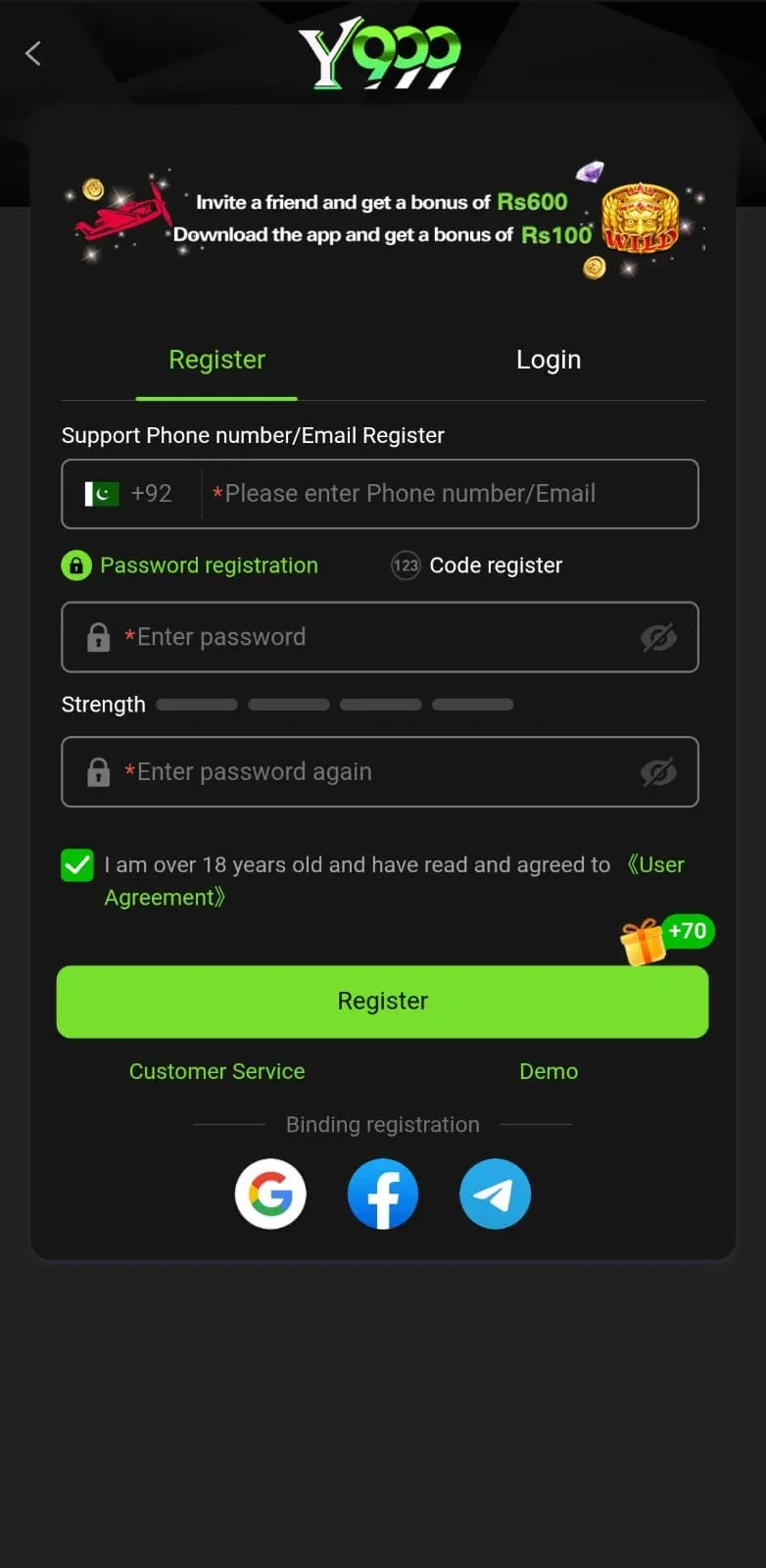
Registration Steps
Everything happens on one screen with just a few fields to fill in - here's what each stage covers.
Choosing Good Registration Details
A handful of choices made during signup are more of a pain to fix later than they seem in the moment - better to get them right the first time:
Register with a number or email you genuinely have ongoing access to. Beyond the initial OTP, it's also your password-reset channel and how support confirms account ownership when something goes wrong. Borrowing a friend's number or using a throwaway inbox tends to end in a locked-out account down the road.
Where the app asks for a name, use your actual one. A mismatch between the registered name and the JazzCash, EasyPaisa, or bank account you'll use for deposits and withdrawals is one of the more frequent reasons a payout gets held up for review - getting it right up front skips that whole headache.
Skip reusing a password from anywhere else. Should that password ever surface in a breach on some unrelated site, every account sharing it becomes an easy target. Keeping a password exclusive to Y999 Game contains the blast radius to just this account.
Turn on a withdrawal PIN if the option exists. It adds a second layer that keeps your balance safe even if someone else gets into the account - setup takes seconds and is worth doing before any money goes in.
Why Verification Matters
It's tempting to treat OTP verification as a box-ticking step, but it quietly does more than just enable login:
It's the mechanism behind one account per person. Linking each account to a verified contact method is how duplicates get caught. Unverified signups sharing a device or details are exactly the pattern that gets flagged.
It's what makes support able to help at all. Recovering access or disputing a transaction relies on support matching you to the verified contact on file - an unverified account is far harder for anyone to confidently confirm as yours.
It gates bonus eligibility. Verified accounts are the only ones that qualify for the welcome bonus and most ongoing rewards - leaving registration incomplete for too long can mean losing the offer entirely.
If You Don't Receive Your OTP
A code that never arrives usually traces back to one of a handful of familiar causes - work down this list before concluding something's actually broken.
Check your signal strength. Weak mobile reception can seriously delay SMS delivery, and a shaky internet connection does the same to email OTPs - try relocating for better signal or hopping onto Wi-Fi.
Give it a minute before hitting resend. A short cooldown after each OTP request is standard to prevent abuse, so mashing "Resend" over and over just resets the same wait - spacing attempts out by a minute or two is more effective.
Look closely at what was entered. One mistyped digit or a small typo in the email means the code is being sent to the wrong place entirely, not that it's lost in transit - re-typing it carefully beats another resend attempt.
Peek into spam or junk. Email providers sometimes default automated OTP messages there, particularly the first one from a sender they don't recognize yet - worth a look before assuming nothing was sent.
Switch delivery methods entirely. Persistent trouble with mobile OTP is a good reason to restart registration with email instead, or the other way around - swapping paths often clears up carrier- or inbox-specific issues faster than repeating the same attempt.
Nothing worked? Reach out through in-app live chat or support@y9.com.pk with the exact number or email used for the attempt - that's the one detail support needs to trace what happened on their side.
Logging Back In
Step 1: Launch the app and select "Login."
Step 2: Fill in the mobile number or email plus password used at signup.
Step 3: Password slipped your mind? "Forgot Password" resets it through an OTP.
That's the short version - the dedicated login guide goes deeper into login troubles, password resets, and what to do when login just won't cooperate.
You're In
Account set up and ready to go. Look for the welcome bonus inside the app, then check out the deposit guide when you're ready to add funds.